
Mockup Automator suite › Watermark Automator
Watermark Automator
Puts your logo on a whole folder of photos. Sign them discreetly in a corner, or tile the logo across the frame when you are sending previews you would rather nobody lifted.
First 10 exports free on the direct download, full plugin, no card required. Adobe Exchange copies are full price from install.
How do you watermark multiple photos in Photoshop?
Overlay the same logo file onto every photo in a folder, either in one corner or tiled across the whole image, at a size and opacity you set as a percentage so it scales with each photo.
- Pick the folder of photos to watermark.
- Pick an output folder.
- Pick your logo file, ideally a transparent PNG.
- Set corner, size, opacity and margin, or switch on tiling, then Run.
How Watermark Automator works
$10 / month · $50 / year
Watermark Automator
-
Corner mode default
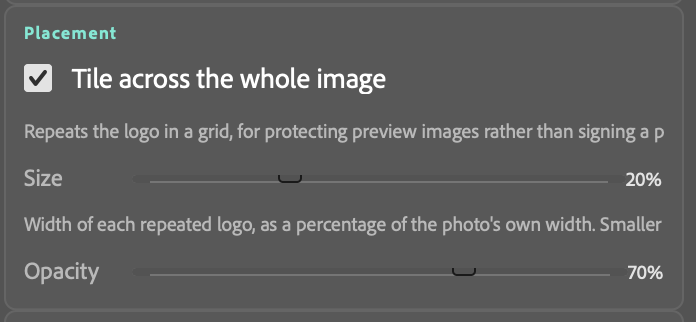
Drops the logo into one of five positions at a size, opacity and margin you set, all as percentages of the photo's own width — so it lands the same relative size on a portrait and a panorama.
-
Tile mode one checkbox
Repeats the logo in a grid across the whole frame instead. This is the one for protecting preview images rather than signing a finished piece. Spacing is worked out for you.
-
Bring your own logo
Point it at a logo file — a transparent PNG works best, since it sits on top of each photo exactly as it is. Nothing to design inside the plugin.
-
Three folders
Photos to watermark, a logo, and somewhere for the results. Your originals are never modified.
Four steps, start to finish
Three folders this time — the photos, somewhere for the results, and the logo itself. Pick a corner, a size and an opacity, and hit Run.


The same three buttons as every plugin in the suite
Learn one and you have learned the rest. Watermark Automator is a single panel in Photoshop with folder pickers at the top, settings in the middle, and Scan, Run and Stop at the bottom — runs locally in your own copy of Photoshop, and can skip files already sitting in the output folder.
Who watermarks photos in bulk?
Anyone putting images online where they can be copied. Watermarking one photo is seconds; watermarking a shoot, a catalogue or a year of work is a job, and it has to be consistent or it looks amateur.
Photographers sharing previews
Client galleries and proofs go out marked, with the clean files released on payment.
Print and art sellers
Listing images are easy to lift and re-list, so a visible mark protects the catalogue.
Stock and portfolio contributors
Preview images are tiled across the whole frame rather than signed in a corner.
Anyone posting to social
A corner signature at low opacity credits the work without spoiling the picture.
The rest of the suite
Each plugin is its own subscription, or take all five on the Suite for $30 a month.